
Mobile app: native or cross-platform?
Before building a mobile app, one decision shapes the whole project: do you build natively for iOS and Android separately, or use a cross-platform framework that targets both from a single codebase? That choice affects budget, timeline, performance and maintenance for years.
Here is a guide without shortcuts, to decide based on your actual situation.
What is a native app?
A native app is built specifically for one operating system: Swift (or Objective-C) for iOS, Kotlin (or Java) for Android.
Advantages of native:
- Maximum performance: direct access to system resources, smooth 60/120 fps animation, minimal latency
- Full access to system APIs: Bluetooth, NFC, ARKit, HealthKit, specific sensors — everything is available with no workaround
- Perfect user experience: native UI components follow Apple and Google guidelines exactly, so the app looks precisely like the system's own apps
- OS updates: a native app benefits immediately from new OS features, without waiting for a cross-platform framework to support them
Drawbacks:
- Two codebases: one for iOS, one for Android. Twice the development, twice the bugs, twice the maintenance.
- Two skill sets: ideally an iOS developer and an Android developer. In practice it is often the same person covering both — but rarely equally well.
- Longer timeline: for equivalent features, native takes more time.
What is cross-platform?
Cross-platform lets you write a single codebase that compiles to both iOS and Android apps. The two dominant frameworks in 2026:
Flutter (Google): compiles to native machine code. The interface is drawn by the framework itself (not by native components), giving full control over appearance and near-native performance on the vast majority of devices. It is our default choice at NexaCode.
React Native (Meta): uses the JavaScript bridge to talk to native components. More mature, large ecosystem, but performance can be lower on complex animation. Ideal if your team already works in JavaScript/TypeScript.
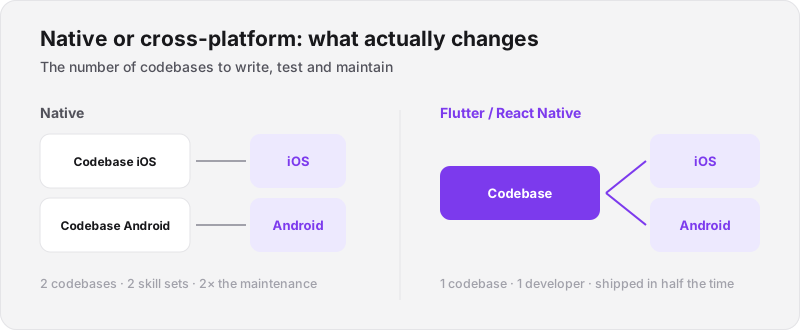
Everything else follows from this: budget, timeline and maintenance load.
Comparison: native vs Flutter vs React Native
| Criterion | Native (iOS + Android) | Flutter | React Native |
|---|---|---|---|
| Codebases | 2 | 1 | 1 |
| Performance | Maximum | Near-native | Good (variable) |
| System API access | Complete | Complete (via plugins) | Complete (via modules) |
| UI fidelity to guidelines | Exactly native | Customisable | Close to native |
| Team size | 2 specialities | 1 developer | 1 developer |
| Development time | Long | Medium | Medium |
| Cost at equal scope | High | Medium | Medium |
| Best for | Games, performance-critical apps | Startups, B2B, e-commerce | JS teams, prototypes |
When do you still choose native in 2026?
The truth is that native is only essential in a narrow set of cases:
Mobile games. 3D engines (Unity, Unreal) have their own constraints. For a graphics-intensive game, native or a dedicated engine remains superior.
Apps with heavy processing. Real-time audio processing, computer vision, advanced AR: if your app lives in that territory, every millisecond counts and native is justified.
Apps using very specific, very recent APIs. If your app depends on an API introduced in the latest iOS or Android release, cross-platform can lag a few weeks before exposing it through a plugin.
Strictly regulated banking or payment apps. Some biometric security and device integrity attestation requirements are better supported natively — although Flutter has closed most of those gaps in recent years.
When do you choose Flutter or React Native?
For 90% of projects — and that is a conservative estimate — cross-platform is the better decision.
MVP and market validation. If you do not yet have paying customers, investing in two native codebases is irrational. Flutter gives you an app on iOS and Android in half the time.
B2B apps and business tools. Management apps (order tracking, mobile CRM, ticketing, dashboards) do not need the newest system animation. They need to be reliable, fast and easy to maintain.
Mobile e-commerce. Flutter handles product catalogues, carts, payments and lists perfectly well. Many Moroccan online stores run on Flutter.
Apps with an Odoo backend. If you already run Odoo, a Flutter app connected to the Odoo API gives real-time access to all the data — stock, orders, customers — from the field.
What traps should you avoid in a mobile app project?
1. Underestimating the backend. The mobile app is the visible part. But if the backend is not designed for mobile (performant API, pagination, offline state handling), the app will be slow and unstable however good the frontend code is.
2. Ignoring the App Store guidelines. Apple and Google reject apps for precise reasons: non-compliant content, badly declared in-app purchases, unjustified permissions. Knowing these rules from the design stage avoids weeks of delay at submission.
3. Not testing on real devices. Emulators do not reproduce real performance, especially on the entry-level Android devices that are widespread in Morocco. Testing on a Samsung Galaxy A15 with 4 GB of RAM matters as much as testing on an iPhone 16.
4. Forgetting updates. A published app is not a finished project. Operating systems evolve, stores change their requirements, third-party APIs move. An app left unmaintained for two years often stops working properly.
How Nexa Code Agency builds your mobile apps
We build primarily in Flutter, with React Native for projects whose team already works in JavaScript. Our approach:
Phase 1 — UX design. Before a line of code, we define the user journeys, the wireframes and the mockups. This is where bad decisions are cheapest to fix.
Phase 2 — MVP development. Essential features first. A testable build ships on TestFlight (iOS) and Firebase App Distribution (Android) in 6 to 10 weeks depending on scope.
Phase 3 — Testing and fixes. Testing on real devices, bug fixing, performance tuning on the target hardware.
Phase 4 — App Store submission. We handle submission to the App Store (Apple) and Google Play, including screenshot and metadata preparation.
Phase 5 — Maintenance. Post-submission updates, adaptation to new OS versions, new features.
See our mobile service for the full offer. For apps connected to an ERP, see our Odoo service.
Frequently asked questions
Does Flutter also work for desktop or web apps? Yes. Flutter targets iOS, Android, web, Windows, macOS and Linux from one codebase. For internal tools and back-office applications, that is particularly attractive.
Can an existing native app be migrated to Flutter? Yes, but it is usually a rebuild rather than a migration. Depending on the state of the existing app, starting cleanly is often faster than porting the code.
Are Flutter apps accepted on the Apple App Store? Yes, without restriction. Flutter is officially supported by both Apple and Google. Thousands of Flutter apps are published on both stores.
Do you need an Apple and a Google developer account? Yes. Apple Developer Program: 99 USD/year. Google Play Developer: 25 USD one-off. We guide our clients through creating and configuring these accounts.
How long does App Store review take? Apple: 24 to 48 hours on average for a first submission, 4 to 24 hours for updates. Google Play: a few hours to 3 days. These times can stretch if the app requires a manual review.
We work with SMEs across Morocco, including in Mohammedia, Casablanca and Rabat.