Odoo: the ERP that structures your SME in Morocco
As a company grows, spreadsheets, lost emails and scattered tools become a real drag. The same data gets re-keyed in three different places. Quotes go missing. Nobody knows exactly where stock stands. Decisions get postponed because the numbers arrive late.
Odoo is the answer a growing number of Moroccan SMEs choose: a modular platform that brings your business processes into a single system, reachable from any device.
What does Odoo cover in a Moroccan SME?
Odoo is not an accounting package or a CRM. It is a full ERP platform, with a module for each business process:
| Area | Available modules |
|---|---|
| Sales | Sales, CRM, quotes, contracts |
| Finance | Invoicing, accounting, expenses |
| Logistics | Purchasing, inventory, delivery notes |
| Manufacturing | Production, work orders, quality |
| HR | Employees, leave, expense claims |
| Communication | Internal messaging, calendar, e-signature |
The key point: every module shares the same database. When a sale is confirmed, stock updates automatically, the invoice is ready to send, and the salesperson sees progress in real time. No more double entry and no more inconsistent data between two tools.
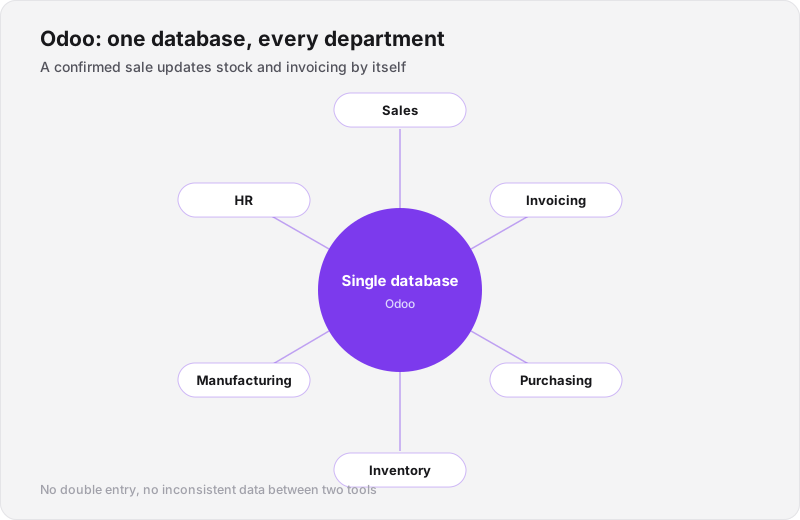
Every module reads and writes the same database: that is what removes double entry.
Does Odoo fit Moroccan regulation?
This is the first question our clients ask. The answer is yes, provided it is configured properly.
Moroccan VAT (20%, 14%, 10%, 7%) is set up in Odoo's fiscal rules. Our rollouts include this configuration for every client.
The digital stamp is a legal requirement for commercial documents in Morocco. We build a custom module that generates and applies the digital stamp to every quote, invoice and delivery note — it ships in all of our Odoo projects.
Statutory financial statements (balance sheet, income statement, cash-flow statement) in Moroccan format can be generated directly from Odoo once accounting is correctly configured.
How Nexa Code Agency has rolled out Odoo for Moroccan SMEs
Concrete cases are the best evidence. Here are four real deployments, with the modules and the outcomes.
ATMI Maroc (construction / industry): the whole construction cycle covered — sales, invoicing, inventory — with a suite of custom technical modules: technical offers, studies, reports, work permits and delivery notes. Before Odoo, the team ran everything on email and Excel. After: technical quotes are generated in minutes, work permits are traceable, and the manager sees site status in real time.
BH Drive (car rental): a complete fleet management platform — bookings, vehicle condition, customer CRM, preventive maintenance — with automated custom reports. Before: car availability lived in a shared spreadsheet. After: bookings, returns and maintenance sit in a single screen.
Gaya Pharma (health / pharmaceutical): a full rollout with a custom business module — nursing follow-up — dedicated to their healthcare activity. The module tracks nursing interventions per patient, with history and associated invoicing.
Yassine Gourri Architecte (architecture — Safi): the architect's entire process digitised — projects, contracts, receipts, office administration — with automated daily, weekly and monthly report generation. Before: every report was produced by hand. After: one click.
All of these are listed in our Odoo portfolio.
Odoo Community or Odoo Enterprise: which edition?
This is one of the first decisions on an Odoo project, and it shapes the budget.
| Criterion | Community (free) | Enterprise (subscription) |
|---|---|---|
| Licence cost | 0 | Per user, per year |
| Source code | Fully open-source | Proprietary (some modules) |
| Advanced modules | No (advanced accounting, e-sign, etc.) | Yes |
| Odoo SA support | No | Yes |
| Updates | Manual | Included |
For most Moroccan SMEs, Odoo Community is enough, especially alongside custom modules built by the integrator. Enterprise earns its keep if you need advanced accounting, native e-signature or Odoo SA support.
Our recommendation: start on Community, identify the precise gaps after three months, then decide whether Enterprise covers them or whether custom development fits better.
What mistakes should you avoid on an Odoo rollout?
We see these regularly with clients who come to us after a first failed deployment:
1. Configuring without analysing the business processes. Odoo can do anything — but if you configure it without understanding how your company actually works, you end up with a system nobody uses. The analysis phase is the most important part of an Odoo project.
2. Deploying everything at once. A big-bang rollout (all modules together) is the surest way to lose your teams. We deploy in phases: sales and invoicing first, then logistics, then the secondary modules.
3. Skipping training. Odoo is intuitive, but your teams need to understand the logic of the system. Without training, modules go under-used and data drifts out of sync.
4. No data migration plan. If you have years of data in Excel or in an older package, migrating it into Odoo must be planned, checked and validated before go-live.
5. Picking a foreign integrator with no local presence. An Odoo rollout needs frequent exchanges, fast adjustments, sometimes a physical presence. An integrator three time zones away slows everything down.
How long does an Odoo rollout take?
Duration depends on the number of modules, the complexity of the processes and the state of the existing data.
- Simple rollout (sales + invoicing + inventory): 4 to 8 weeks
- Rollout with custom modules: 8 to 20 weeks
- Full multi-department rollout: 4 to 9 months
These durations include analysis, configuration, custom development where needed, testing, data migration and team training.
How does Nexa Code Agency deploy Odoo?
Our method, in five steps:
- Needs analysis: two or three working sessions with your teams to map current processes and identify priorities
- Configuration and setup: installation, chart of accounts, taxes, users and workflows
- Custom development: business modules specific to your activity (digital stamp, custom reports, third-party integrations)
- Data migration: importing your products, customers, suppliers and history from Excel or your previous system
- Training and go-live: role-based training sessions (sales, accounting, logistics) and support through the first weeks of use
See our Odoo ERP service for the details of our integration offer. For projects needing dedicated infrastructure, our DevOps service covers Odoo hosting and server maintenance.
Frequently asked questions
Can Odoo be customised without modifying the core? Yes. Odoo is designed to be extended with custom modules without touching the main source code. That keeps you compatible with future updates.
Does Odoo work on mobile? Yes. The interface is responsive, and there are iOS and Android apps for field work (sales visits, stock counts, timesheets).
Can Odoo connect to our existing website? Yes, through Odoo's REST API. We have connected Odoo to Next.js sites, online stores and third-party tools (e-commerce platforms, point-of-sale software).
Can Odoo replace our current accounting software? For most Moroccan SMEs, yes — provided accounting is configured correctly and your chartered accountant signs off on the setup. We always recommend involving your accountant from the analysis phase.
What if we want to add modules later? That is one of Odoo's biggest advantages. You start with what you need and add modules as the business requires, with no migration and no change of software.
We work with SMEs across Morocco, including in Mohammedia, Casablanca and Rabat.